Project Organization On The Editing Drive
Drive Files System and Name
The first step is to make sure that the editing drive is formatted correctly: Mac OS Extended (Journaled) if the editor is working on a Mac, or NTFS if the editor is working on a PC.
Here’s a naming convention for the external drives based on the project name (e.g., KOP):
KOP_A1: Drive used by theAssistant EditorKOP_A2:Backupof theAssistant Editor’s drive (should be updated regularly in case of emergency)KOP_B1: Drive used by theEditorKOP_B2:Backupof theEditor’s drive
You can apply the same logic to other projects by replacing “KOP” with the relevant project name.
Drive Backup
It is crucial to create backups using specialized software, such as Carbon Copy Cloner. This tool verifies checksums, ensuring a 100% accurate copy of the data. Additionally, it saves time by copying only new or modified files, rather than duplicating the entire drive each time.
Another critical feature is SafetyNet — a safety mechanism that helps prevent accidental data loss on the destination drive by preserving older versions of modified or deleted files.
The Folder Structure on the Drive
Avid MediaFiles
├── MXF
│   ├── 1
│   ├── 2506090101
│   ├── 2506090201
│   ├── 2506090202
│   └── ...
FILM_NAME
├── 01 DOCUMENTS
│   ├── 01_01 Script
│   ├── 01_02 Lined Script
│   ├── 01_03 Daily Edit Logs
│   ├── 01_04 Clip Reports
│   ├── 01_05 Sound Reports
│   ├── 01_06 Progress Reports
│   └── 01_07 ALE files
├── 02 PROJECT
│   ├── Avid project
│   └── zOLD
├── 03 GRAPHICS
│   ├── 03_01 Logo
│   ├── 03_02 Titles
│   └── 03_03 Elements
├── 04 VFX
├── 05 SOUND
│   ├── 05_01 SFX
│   └── 05_02 MX
├── 06 SOURCES
│   ├── 06_01 Audio
│   └── 06_02 Video
├── 07 EXPORTS
│   ├── 07_01 Outputs
│   └── 07_02 Turnovers
│       ├── 01_PIX
│       │   └── •Template
│       │       ├── AAF
│       │       ├── Avid Bin
│       │       ├── Change Lists
│       │       ├── EDL
│       │       ├── Paperwork
│       │       └── REF
│       └── 02_SND
│           └── •Template
│               ├── AAF
│               ├── Change Lists
│               ├── EDLs
│               ├── Guide Tracks
│               └── REF
└── zOTHER
    └── Avid settings
Here is the link to the prepared template.
Avid MediaFiles Folder Organization
The Avid MediaFiles folder must always be located at the root level of the drive.
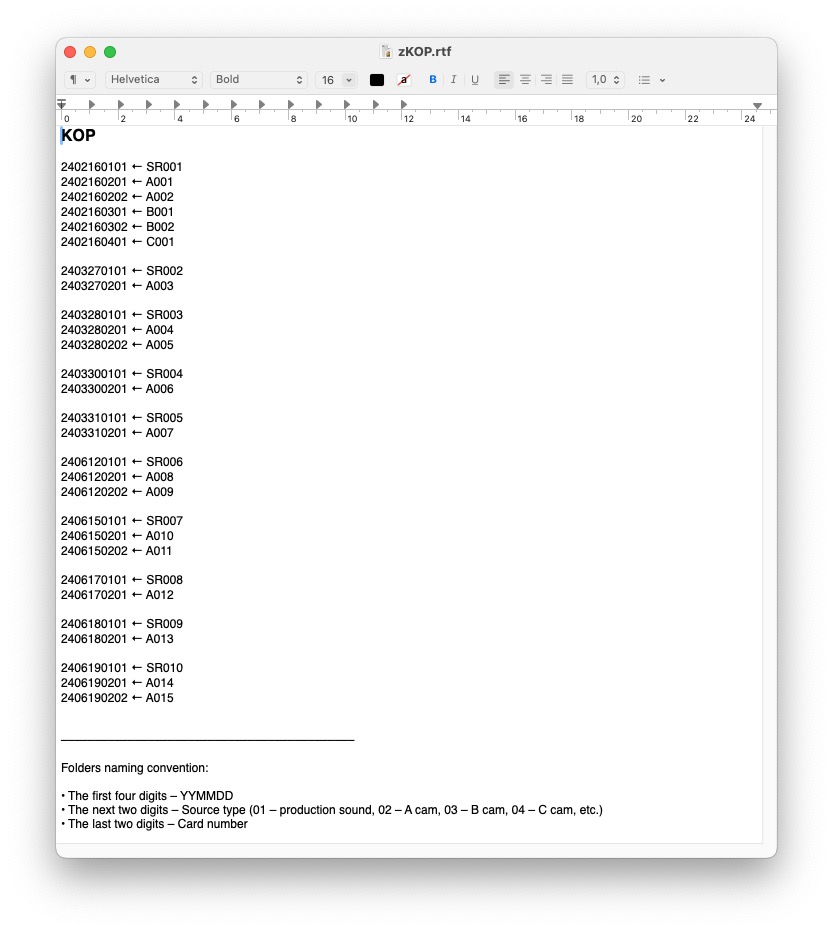
Inside Avid MediaFiles, there is a folder called MXF, which contains numbered subfolders (it is essential to use digits only in the folder names).
Next to the MXF folder, there should also be a text file named after the project, for example: zKOP.txt. The z prefix ensures the file appears at the bottom of the folder listing. This .text file serves as a detailed log of the contents of the MXF folder.
Folder Naming Convention Inside the MXF Folder
- First 4 digits — Date: YYMMDD
- Next 2 digits — Source type:
- 01 —
Production sound - 02 —
A cam - 03 —
B cam - 04 —
C cam - (etc.)
- Last 2 digits — Card number
Example: 2506090202 → Material shot on June 9, 2025, from A cam, card 02.
Production Reports
One of the tasks of the Assistant Editor is to organize Camera Reports, Sound Reports, Clip Reports, and Script Supervisor Reports in their corresponding folders.
The folder 01_01 Script should contain the script in .pdf format and, if provided, the script in .txt format for import into Avid and creation of ScriptSync.
The folder 01_02 Lined Script should contain photos of the Lined Script made by the Script Supervisor. Since filming is usually done non-linearly, new shots may occasionally be added to scenes. Consequently, the Lined Script will be updated, and previously saved files with incomplete versions should be deleted.
The file names should follow this format:
SC_25_p1
SC_25_p2
SC_25_p3
The letter p at the end indicates the page number if the scene spans more than one page in the script.
The folder 01_03 Daily Edit Logs should contain the Editor’s Daily Log in .xls format. Typically, the Script Supervisor maintains the log in the cloud, which means the .xls file should be exported into this folder once filming is completed.
The folder 01_04 Clip Reports should contain the reports prepared by the DIT. These are usually provided in .pdf format.
The file names should follow this format:
250609_D01_Clips_Report
250610_D02_Clips_Report
The folder 01_04 Clip Reports should contain the reports generated by the production sound mixer on set. These are often .csv files automatically generated by the audio recorder.
The folder 01_06 Production Reports should contain the so-called Production or Progress Reports created by the Script Supervisor. These are usually provided in .pdf format.
The folder 01_07 ALE files should contain ALE (Avid Log Exchange) files generated by the DIT. These files include additional metadata for each clip.
The file names should follow this format:
250609_D01_Log
250610_D02_Log
Project Folder
The folder 02 PROJECT contains the Avid project. Inside this folder, there is also a subfolder named zOLD, which is used to store project backups. These backups should be created periodically—say, once a week—to allow reverting to an earlier version if needed.
To create a backup, archive the project folder into a .zip file and name it using the following format:
PROJECT_NAME_YYMMDD
For example: KOP_250616.
Graphics Folder
The 03 GRAPHICS folder is structured as follows:
-
03_01 Logos– Contains all logos that will be used in the opening and closing credits. -
03_02 Titles– Contains temporary or final opening and closing titles created by thegraphic designer. -
03_03 Elements– Contains various graphic elements needed during the editing process (e.g., overlays, nameplates, interface components, motion design assets).
VFX Folder
The 04 VFX folder contains all versions of shots received from the VFX department.
Sound Folder
The 05 SOUND folder contains two subfolders:
SFX– for sound effects- Steps
- Cars
- Horses
- etc.
MX– for musicTemp Music– temporary music used during editingMusic from Composer– original score delivered by thecomposer
Sources Folder
The 06 SOURCES folder includes two subfolders:
-
Audio– This folder should contain allproduction sound, organized into subfolders by shoot day, for example: -
DAY01_250609 DAY02_250610-
etc.
-
Video– Onfeature-length projects, this folder typically remains empty, as editing is done usingproxy filesstored in theAvid MediaFilesfolder. However, this folder can be used to storechecksum files(usually with the.md5extension) provided by theDIT.
These .md5 files should be renamed using the following format:
DAY01_250609DAY02_250610- etc.
Where the numbers represent the shoot date in
YYMMDDformat.
Exports Folder
The 07 EXPORTS folder contains two subfolders:
-
Outputs– This folder stores video and audio exports created for various purposes such as test screenings, promo materials, internal reviews, etc. -
Turnovers– This folder contains files exported for use in other departments. It is organized as follows: -
PIX– For materials sent tocolor grading,graphics, orVFX SND– For materials sent to thesound departmentorcomposer
Each export folder inside Turnovers should be named based on the export date and the department receiving the turnover.
Naming format: YYMMDD_DEPARTMENT (e.g., 250810_VFX, 250820_DI, 250815_SND)
zOther Folder
This folder is typically used to store Avid settings, allowing for a quick setup when working on the project from another workstation.
It also serves as a place for miscellaneous files that don’t logically fit into any of the other project folders.